










Heroes and Castles 2: Premium
Survivalcraft

LEGO ® Marvel Super Heroes
Door Kickers: Action Squad
Star Survivor:Premium
ScourgeBringer
Cover Fire: Offline Shooting
Mortar Defense

Wizard of Legend

Shadow Fight 2 Special Edition
Advertisement

Free Fire MAX
Garena International I
Updated Time
Apr 1, 2026
Category
Action
Installs
10M+
Content Rating
Updated Time
Apr 1, 2026
Privacy Policy
View PolicyCategory
Action
Developer
Garena International I
Installs
10M+
Content Rating
Screenshots

Advertisement
Editor Reviews
• What is Free Fire MAX?
Immersive Battle Royale
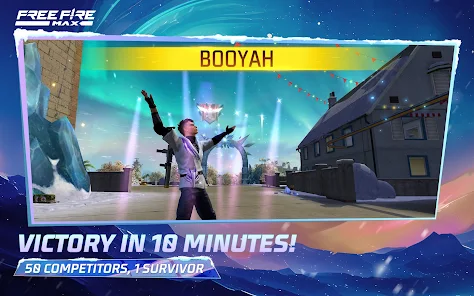
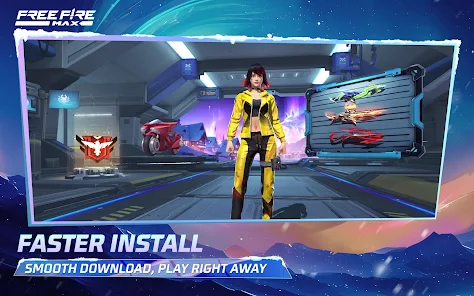
Free Fire MAX is a high-octane 50-player survival shooter with 10-minute rounds, built for Ultra HD graphics, smoother effects, and heart-pounding action on every drop-in. ??
Enhanced Visuals & Effects
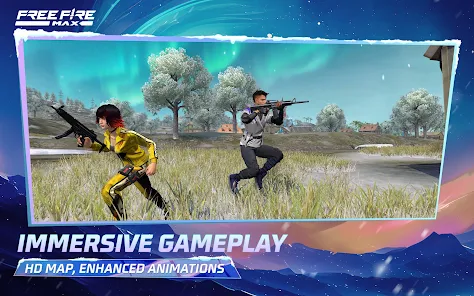
Upgraded textures, realistic shadows, and dynamic animations make gunfights pop; customizable HUD and crisp sound create a cinematic feel without changing core gameplay. ??
Seamless Firelink System
Firelink lets existing Free Fire accounts jump in instantly, keeping progress, skins, and friends; cross-play ensures squads stay together across MAX and classic. ?⚡
Modes, Maps & Mayhem
Clash Squad 4v4, ranked BR, and themed events add fast tactics and fresh loot; vehicles, gloo walls, and unique character skills spark clutch plays. ??️?
• How to Play?
Step 1: Quick Start
Step 2: Jump in, pick a mode, and survive to the last squad. Simple controls, quick matches, and smart loadouts make each drop thrilling and beginner-friendly. ??
Step 3: Install & Link Account
Step 4: Install from the store, open Free Fire MAX, and sign in via Firelink to sync progress, friends, and cosmetics from Free Fire. First-time players can create a guest or social ID. ?
Step 5: Tune Settings
Step 6: Enter Settings > Graphics to choose Balanced/Ultra, enable High FPS, and set controls in HUD Customization. Reduce sensitivity per scope for steadier aim. ?️
Step 7: Pick Mode & Map
Step 8: Select Battle Royale or Clash Squad in Play. Choose ranked or casual, confirm map when available, and check event tabs for limited-time modes or rewards. ?️
Step 9: Drop Smart
Step 10: On spawn plane, mark a mid-tier zone, glide to loot buildings fast. Prioritize AR/SMG, medkits, gloo walls, and a vest/helmet. Avoid hot drops until gear feels solid. ?
Step 11: Fight & Survive
Step 12: Use cover and gloo walls, crouch-peek, and rotate with the safe zone. Pair character skills (e.g., movement + healing) and share ammo with squad via quick ping. ??️
Step 13: Upgrade & Communicate
Step 14: Visit Loadout and Characters to level skills, equip pets, and set emotes. Enable voice or quick chat, mark enemies with ping, and request items from teammates. ?️
Download for App
Ratings
Similar Games


Online Games














Disclaimer
WinWilder does not represent any developer, nor is it the developer of any App or game.
WinWilder provides screenshots, historical version APK, links and other information collected from Google Play.
All trademarks, registered trademarks, product names and company names or logos appearing on the site are the property of their respective owners.
We guarantee the security of APK files downloaded from our site and also provide the official download link at Google Play Store and App Store.