











Heroes and Castles 2: Premium
Survivalcraft
LEGO ® Marvel Super Heroes
Door Kickers: Action Squad
Star Survivor:Premium
ScourgeBringer

Cover Fire: Offline Shooting

Mortar Defense

Wizard of Legend

Shadow Fight 2 Special Edition
Advertisement
Parking Order!
Updated Time
Apr 2, 2026
Category
Puzzle
Installs
10M+
Content Rating
Updated Time
Apr 2, 2026
Category
Puzzle
Installs
10M+
Content Rating
Screenshots
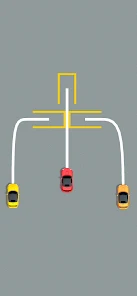
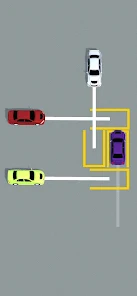
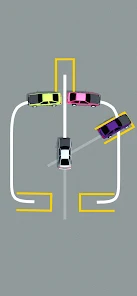
Advertisement
Editor Reviews
• What is Parking Order!?
Park & Sort Puzzle
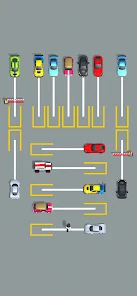
Parking Order! is a casual puzzle of sorting cars into the right bays in correct sequence. Smooth drag moves, crisp visuals, and satisfying clicks make each clear lot feel delightful. ?✨
Why It Stands Out
Smart level design mixes lane locks, barriers, and colors, turning simple starts into clever challenges. Gentle hints, smooth animation, and rewarding streaks deliver cozy, bite-size fun. ??
Fun Hooks
Collect sleek car skins, unlock fresh maps, and chase perfect orders for combo bonuses. Dynamic obstacles—cones, gates, turntables—keep the parking yard lively, surprising, and satisfying. ??
Play Anywhere
Short levels fit a commute or coffee break. Offline-friendly sessions, instant restarts, and low-friction controls make a relaxing loop that feels polished, crisp, and replayable. ☕?
• How to Play?
Step 1: Arrange cars by dragging them into correct bays and order without blocking lanes or exits. Plan a few moves ahead, use free spaces wisely, and clear the lot to finish with a perfect parking sequence. ??
Step 2: Observe the board
Step 3: Scan lanes, colors, numbers, and exit signs. Identify blocked cars and free gaps. Note gates, cones, and one-way arrows that restrict movement. Sketch a quick route in mind before the first drag. ??️
Step 4: Drag to move
Step 5: Press and hold a car, then drag along allowed paths to an open spot or target bay. Keep within lane boundaries; respect one‑way arrows. Release only when the outline turns green to confirm. ✋➡️?
Step 6: Create buffer space
Step 7: Free a buffer slot by moving an easy car aside. Use this space to shuffle others through tight lanes. Alternate between rows to relieve bottlenecks, keeping exits clear for the next car in sequence. ??
Step 8: Follow order rules
Step 9: Follow order rules shown at the top: by color, number, or icon. Park cars in matching bays or highlighted zones. Mistakes break combos; tap undo to fix placements and restore a clean sequence. ??↩️
Step 10: Use tools wisely
Step 11: Use tools wisely: hint highlights a safe move; undo steps back. Activate boosters like swap or cone removal when available to break jams. Save power‑ups for late challenges for bigger impact. ?️?
Step 12: Finish and upgrade
Step 13: When the lot is perfectly ordered, collect rewards and stars. Spend coins to unlock skins or maps in the garage. Replay levels to boost streaks, improve times, and earn extra bonus chests. ???
Download for App
Ratings
Similar Games







Online Games















Disclaimer
WinWilder does not represent any developer, nor is it the developer of any App or game.
WinWilder provides screenshots, historical version APK, links and other information collected from Google Play.
All trademarks, registered trademarks, product names and company names or logos appearing on the site are the property of their respective owners.
We guarantee the security of APK files downloaded from our site and also provide the official download link at Google Play Store and App Store.