







Heroes and Castles 2: Premium
Survivalcraft
LEGO ® Marvel Super Heroes
Door Kickers: Action Squad
Star Survivor:Premium
ScourgeBringer
Cover Fire: Offline Shooting
Mortar Defense
Wizard of Legend
Shadow Fight 2 Special Edition
Advertisement

Roblox
Roblox Corporation
Updated Time
Apr 1, 2026
Category
Sandbox
Installs
10M+
Content Rating
Updated Time
Apr 1, 2026
Privacy Policy
View PolicyCategory
Sandbox
Developer
Roblox Corporation
Installs
10M+
Content Rating
Screenshots
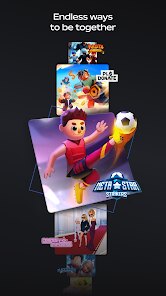
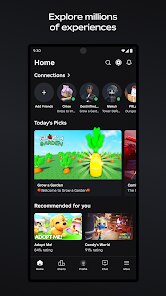
Advertisement
Editor Reviews
• What is Roblox?
Game Overview
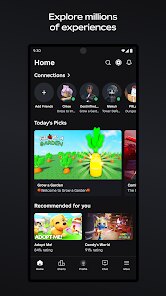
Roblox is a vast platform of player-made worlds. Join adventures, roleplay, obbies, and creative hubs—on mobile, tablet, or PC. Play, create, and explore together ??.
Why It Stands Out
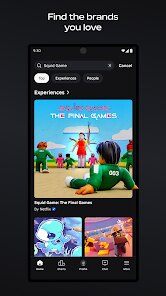
Millions of experiences updated daily, cross-platform play, customizable avatars, and social features. Team up, discover trends, and find something new every session ✨?.
Fun Highlights
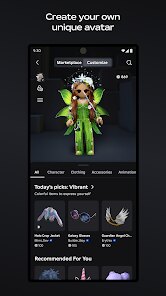
Build dream spaces, try fast parkour, tycoons, simulators, and story games. Unlock items, emotes, and gear; dress up with outfits, faces, and accessories. Fresh events and collabs ??️.
Safety & Community
Roblox includes reporting tools, chat filters, and parental controls. Explore curated picks, follow creators, and join groups. Play safely, learn, and share moments together ??.
• How to Play?
Step 1: Start by installing Roblox, creating an account, and setting preferences. Then browse Discover to find an experience that fits the mood and device ???.
Step 2: Install from Google Play, open the app, and sign up with email or phone. Verify the account to secure access and enable cloud features; set a strong password ?.
Step 3: Set age, privacy, and chat rules in Settings > Privacy. Enable Parental Controls and a PIN for family accounts; limit who can chat or join ?.
Step 4: Tap Discover, use search or categories, and check thumbnails, ratings, and player counts. Save favorites with the heart icon for quick access ⭐.
Step 5: Press Play on an experience. Learn controls: move with the joystick, tap Jump, swipe to aim the camera, and use on-screen prompts to interact ?.
Step 6: Customize the avatar: open Avatar, choose outfits, faces, and animations. Try free items; purchase with Robux if desired. Save multiple looks ?.
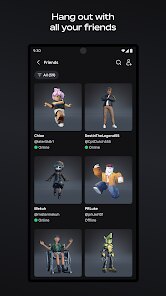
Step 7: Connect with others: add friends from profiles, follow creators, and join groups. Use chat responsibly; report issues via Menu > Report Abuse ?️.
Download for App
Ratings
Similar Games







Online Games














Disclaimer
WinWilder does not represent any developer, nor is it the developer of any App or game.
WinWilder provides screenshots, historical version APK, links and other information collected from Google Play.
All trademarks, registered trademarks, product names and company names or logos appearing on the site are the property of their respective owners.
We guarantee the security of APK files downloaded from our site and also provide the official download link at Google Play Store and App Store.