












Heroes and Castles 2: Premium
Survivalcraft

LEGO ® Marvel Super Heroes

Door Kickers: Action Squad

Star Survivor:Premium
ScourgeBringer

Cover Fire: Offline Shooting

Mortar Defense

Wizard of Legend

Shadow Fight 2 Special Edition
Advertisement
Talking Tom Cat
Outfit7 Limited
Updated Time
Apr 1, 2026
Category
Casual
Installs
10M+
Content Rating
Updated Time
Apr 1, 2026
Privacy Policy
View PolicyCategory
Casual
Developer
Outfit7 Limited
Installs
10M+
Content Rating
Screenshots


Advertisement
Editor Reviews
• What is Talking Tom Cat?
Iconic Talking Pet ?
Talking Tom Cat is the original chatty virtual pet from Outfit7. Speak, and Tom repeats in a goofy voice while reacting to taps and gags. A quick laugh machine loved worldwide.
Why It Stands Out ⭐
Instant voice mimicry, slapstick reactions, and simple one‑finger controls make it perfect for short breaks. Zero grind, pure giggles, family‑friendly fun that works anytime, anywhere. ?
Fun Highlights ?
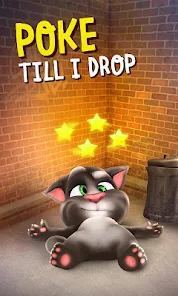
Pet to purr, poke to yelp, and pour milk ? for silly burps. Try different gestures and timing to unlock varied animations. Quick, colorful reactions keep sessions fresh and snackable.
Shareable Moments ?
Record hilarious clips and share with friends in seconds. Tom’s mimic + antics create bite‑size videos ideal for chats and stories. Easy to create, fun to rewatch. ✨
• How to Play?
Step 1: Meet Tom and start the laughs. Mic access lets him repeat speech, while taps and icons trigger gags. Simple controls mean instant fun at home, on the go, or anywhere. ??
Step 2: On first launch, allow microphone permission. Speak near the device; Tom listens and repeats in a playful pitch. Clear articulation improves results, noisy rooms reduce clarity. ?
Step 3: Tap Tom’s head, belly, or paws to test reactions. Gentle pets make purrs, sharp pokes cause yelps, and tail pulls deliver slapstick. Try long presses for extra animations. ?
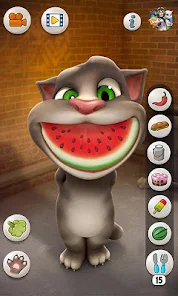
Step 4: Feed Tom by tapping the milk icon ?. Wait as he sips, then watch the burp gag. Pause between taps to vary pacing; different rhythms can trigger fun, slightly changed responses.
Step 5: Explore action icons around the screen ?. Each triggers a specific joke or sound. Icons glow when available; experiment to discover toys, cushions, and comic effects.
Step 6: Hit the camera icon to record ?. Capture voice mimic plus gags, then save or share to messaging apps. Keep clips short for smooth export and faster sending.
Step 7: Open settings ⚙️ to toggle sounds, language, and content options. Reset Tom’s state if needed to start fresh; handy for quiet play or kid‑safe sessions.
Download for App
Ratings
Similar Games













Online Games















Disclaimer
WinWilder does not represent any developer, nor is it the developer of any App or game.
WinWilder provides screenshots, historical version APK, links and other information collected from Google Play.
All trademarks, registered trademarks, product names and company names or logos appearing on the site are the property of their respective owners.
We guarantee the security of APK files downloaded from our site and also provide the official download link at Google Play Store and App Store.